Sending Assessments
Send assessments with intake and consent
New patients go through your full intake pathway — registration, consent, admin forms, then assessments.
9 steps · 4 min read
Click Send
Registration and
Add your
Send, then
Client registers
Client signs
Client completes
Client completes
Everything lands
Click Send assessment
Open the send drawer from the client's record.
Registration and consent are already there
At a client's genuine first contact — no registration on record, no consent signed — your practice adds both to the link for you. They are named in the panel at the bottom of the drawer, under the line "Included by your practice default". You do not have to go and find them.
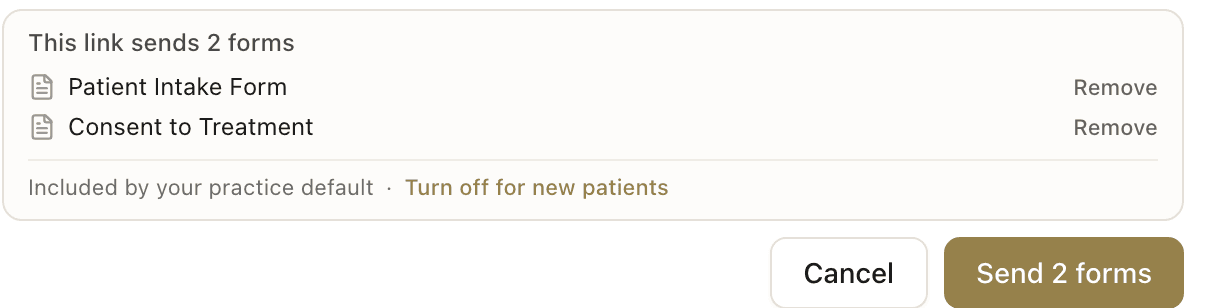
Add your assessments on top
Tick the clinical assessments this client should complete. They are added to registration and consent, not instead of them — the count on the Send button goes up as you tick. For an existing client who already has both on record, use the pathway dropdown to enrol them in the full flow instead.
Send, then choose how it reaches them
Check the footer names everything you meant to send, then press the button. The screen after it is what delivers the link: Send email now, Fill in together now, or Copy link to share. Closing it keeps the link and notifies nobody.
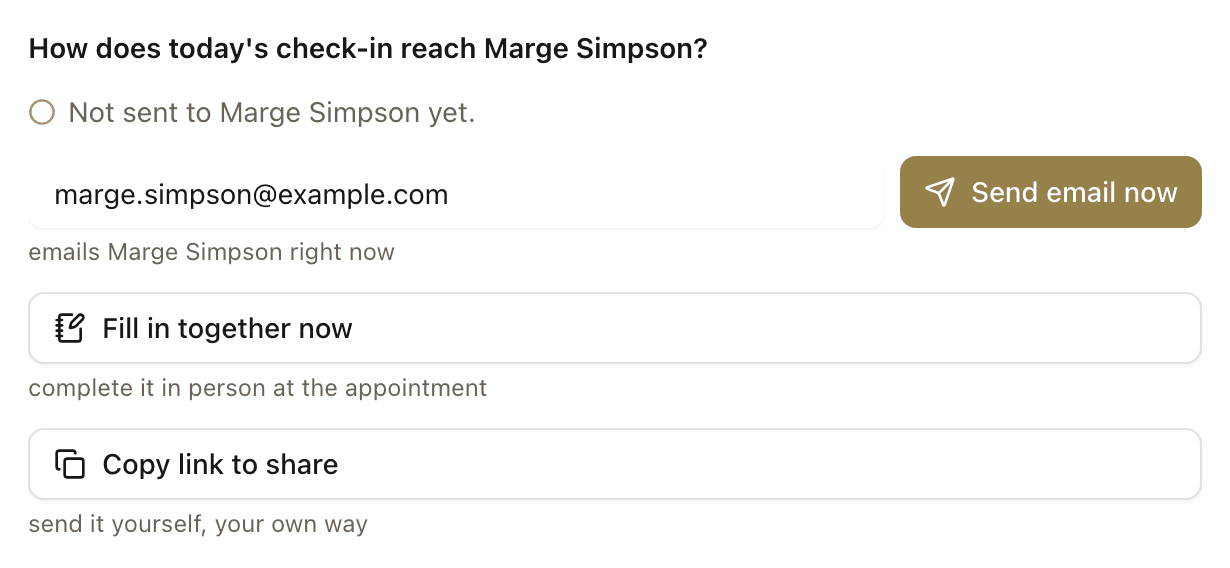
Client registers
The client opens the link and fills out the intake form (or provides basic details, depending on your pathway settings).
Client signs consent
Next, the client reads and signs your consent form. Their signature is stored with a timestamp.
Client completes admin forms
If your pathway includes billing or admin forms (bulk billing consent, release of information), the client completes those next.
Client completes assessments
Finally, the client completes the clinical assessments you selected. Same experience as a standalone assessment — neurodivergent-friendly design, progress tracking, time estimates.
Everything lands on your dashboard
Consent is stored with signature. Admin form responses are emailed to your practice. Assessment results are auto-scored. Everything is grouped under the client's record — ready before their first appointment.
Frequently asked questions
What if the patient already exists in my system?▾
Do I need a Professional plan for this?▾
Related guides
Set up a patient intake pathway
Combine intake, consent, admin forms, and assessments into a single link patients complete before their first appointment.
Send an assessment to a patient
Create a patient, choose an assessment, and share the link — scored results appear on your dashboard.
Share your onboarding link
Your permanent practice link — patients register, sign consent, and complete forms without you creating their record first.
Ready to try a different approach?
Calm forms for the people filling them in. Scored results and reports for you.
Full Professional access for 30 days, no card. Then a free plan with 3 forms and 10 responses.
Quiet design. Real impact.