Practice Setup
Review your consent forms
Your practice starts with consent and admin forms already drafted. Read each one, change what you want, and make it live.
5 steps · 3 min read
Open Client
Press Review
Change anything
Press "Save
Add another
Open Client Forms and find section 2
Section 2, Practice forms, holds the consent and admin documents clients read and sign. You do not have to write these: a set is already drafted for you. Anything marked "Draft, ready for your review" has a Review button beside it.
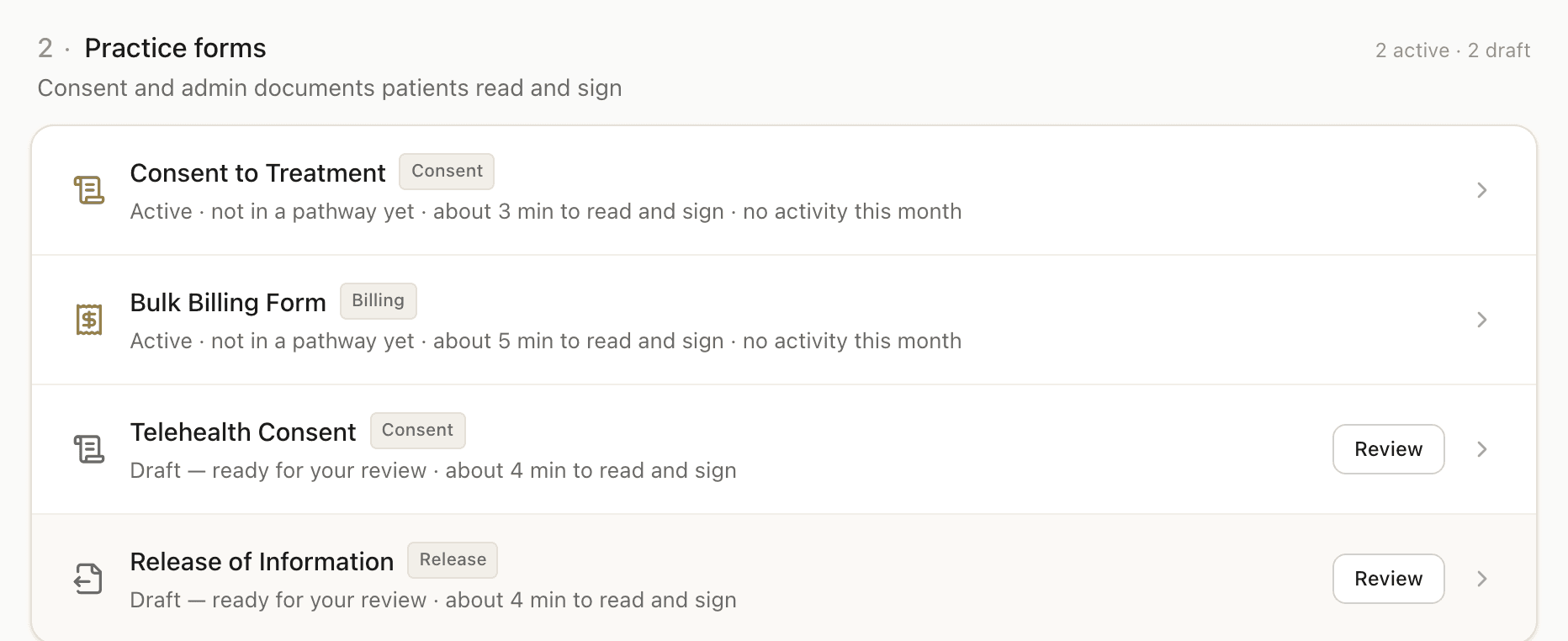
Press Review and read it
The form opens section by section, with each one marked Included or Excluded so you can see at a glance what a client will actually be shown.
Change anything that is not right for you
Edit the wording, exclude a section you do not use, or add one of your own. These are your documents; the draft is only a starting point. Your name, credentials and fees come from your settings and appear on these forms, so there is nothing to retype.
Press "Save & mark reviewed"
That is what takes it out of draft. The row changes from "Draft, ready for your review" to Active, and the form can be sent to clients from that moment. Do this for each form you intend to use, and leave the rest as drafts.
Add another form if you need one
New Form, at the bottom of section 2, starts either an Agreement (four sections plus a signature, ready to edit) or a blank form with just a signature section. Use it for anything your practice needs that is not already drafted.
Frequently asked questions
Do I have to write my consent forms from scratch?▾
What is the difference between Draft and Active?▾
How do clients sign?▾
Can I have more than one consent form?▾
Related guides
Turn on your registration form
Switch on the form new clients fill in about themselves, and choose what it asks.
Edit a consent or practice form
Update the wording or sections of a form you have already set up. Consents already signed are not affected.
Create a patient form
Build a custom consent form, billing agreement, authorisation, or policy from scratch using the template editor.
Ready to try a different approach?
Calm forms for the people filling them in. Scored results and reports for you.
Full Professional access for 30 days, no card. Then a free plan with 3 forms and 10 responses.
Quiet design. Real impact.