Practice Setup
Start from a ready-made setup
Add a whole way of working at once: the forms, registration and an intake link for an assessment or for therapy, shown in full before anything changes.
5 steps · 3 min read
Checked against the product on .
The route
- Settings in the left-hand menu
- Ready-made setups
- See what this adds
- Add this to my practice
Step 1: Open the ready-made setups
You
As a practice owner or admin, open Settings in the left-hand menu, then Ready-made setups. While Settings asks you to decide how new clients reach you, the card at its top offers See the ready-made setups too.
Step 2: Pick the one that matches your work
You
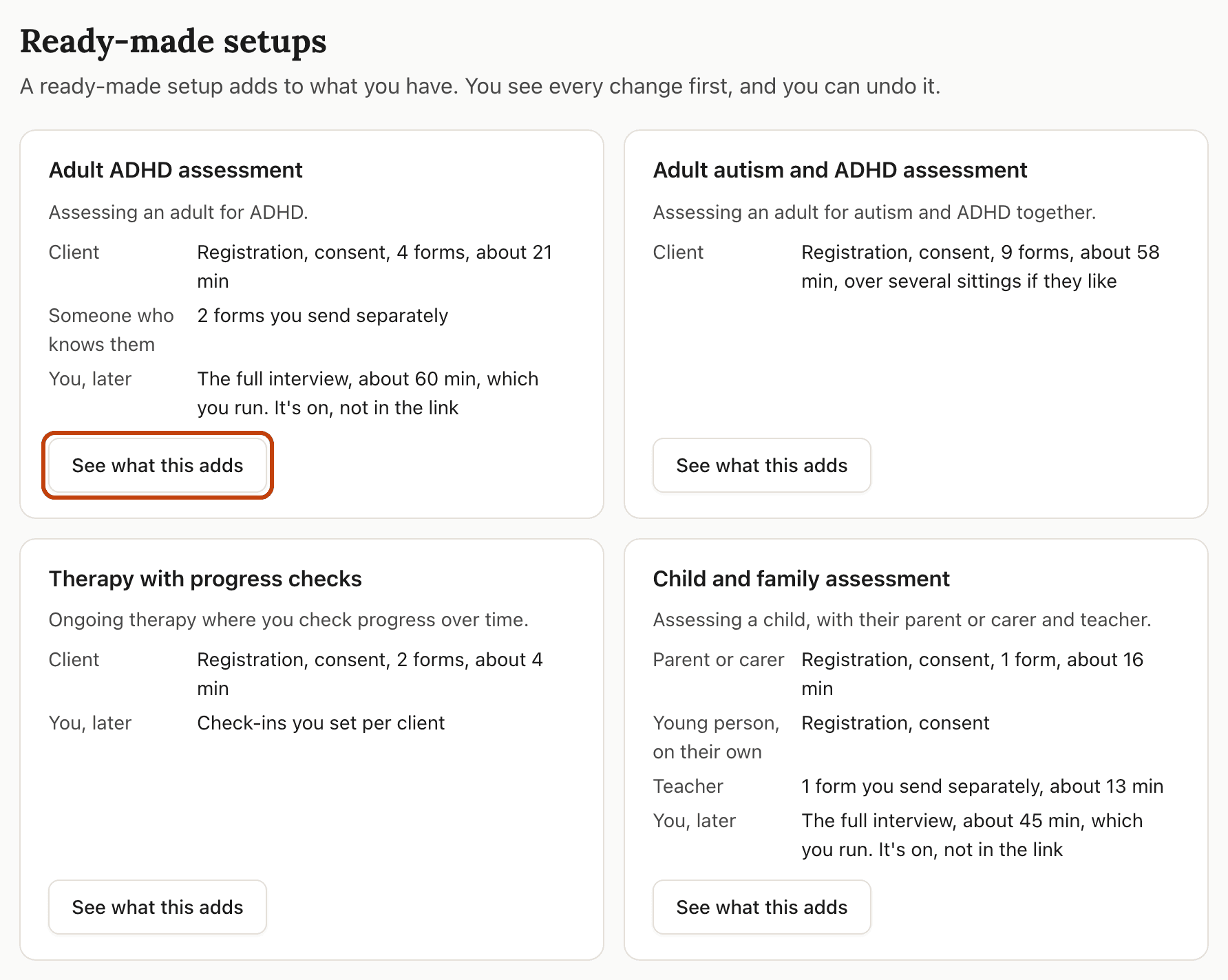
There are four, in the same order for everyone: Adult ADHD assessment, Adult autism and ADHD assessment, Therapy with progress checks, and Child and family assessment. Each card says who fills in what. Press See what this adds on the one you want. None of these fit? Build your own in Forms.
Step 3: Read what it adds
You
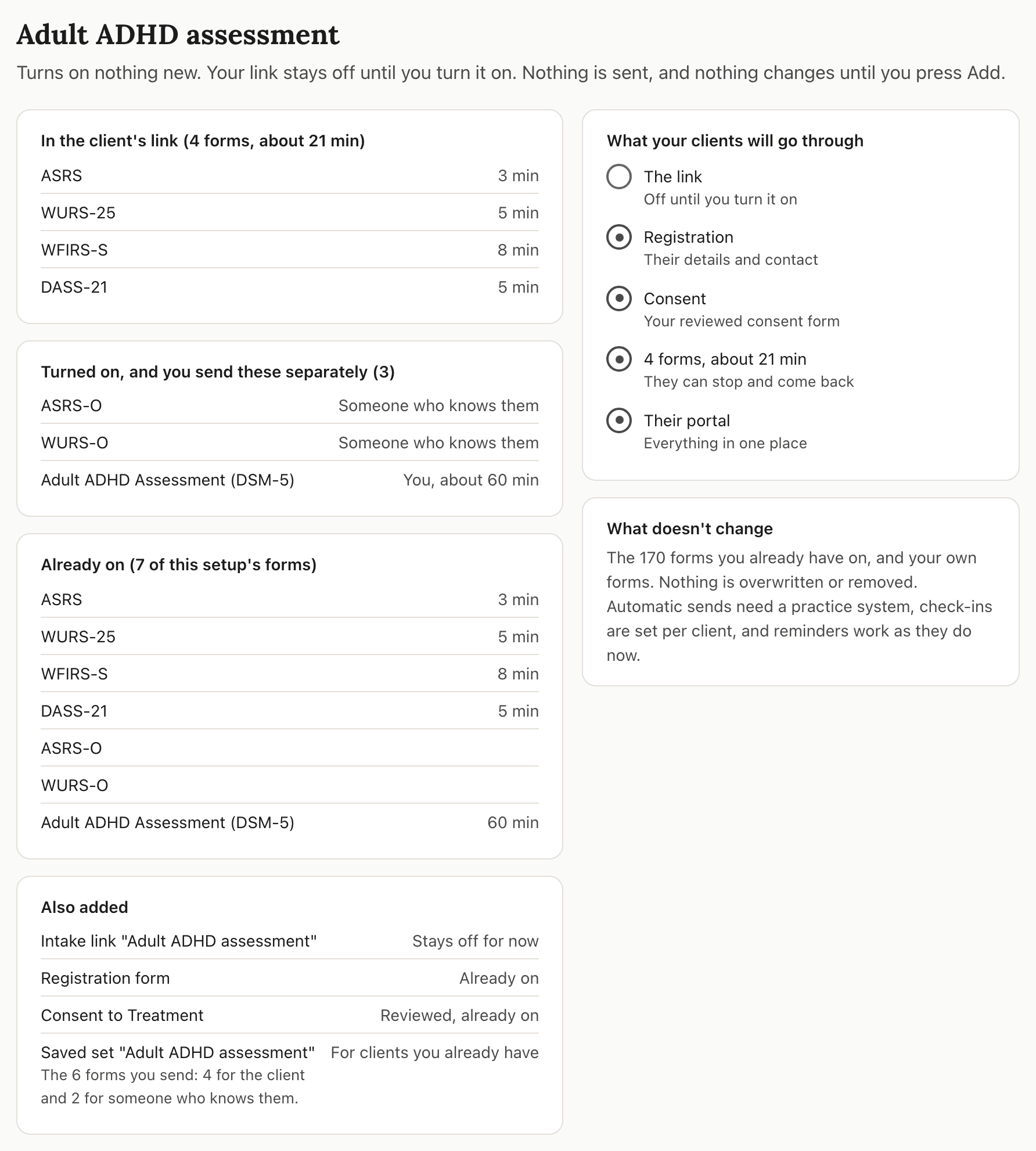
The next page lists every change before anything happens: the forms it turns on, the forms already on, what your clients will go through, and what doesn't change. A new intake link stays off until you turn it on. On a plan with a form limit, the page says which forms fit and which are left out.
Step 4: Press "Add this to my practice"
You
Adding sends nothing to anyone, and it never turns your own forms off. On a plan with a form limit the button reads Add what fits to my practice. If your practice changed since you opened the page, nothing is added and the page shows what it would do now.

Step 5: Settings shows the next step
Automatic
You return to Settings, where the card at the top shows the setup's next step, such as reviewing your consent form or turning on your intake link. The setup is listed under its own name on Ready-made setups. Nothing reaches a client until you share the link or send forms yourself.
Frequently asked questions
Can I undo a setup?
Yes. In Settings, open Ready-made setups and press Undo this setup under its name. You see what would change and what stays before anything happens. Forms it turned on are turned off, not deleted, unless something now relies on them; the page says which stay. Your clients' answers and records are never touched, and undo never changes your consent form. You can add the setup again later.
Will it change forms I already use?
No. A setup only adds. Forms you already have on stay on, and the preview lists them under Already on.
Can someone in my team who isn't an owner or admin add one?
No. They can see that ready-made setups exist, and the page tells them a practice owner or admin sets these up.
What if none of them fit my practice?
Build your own in Forms. Each setup uses forms and links you can also set up one at a time.
Related guides
Turn on your registration form
Switch on the form new clients fill in about themselves, and choose what it asks.
Set up a patient intake pathway
Combine intake, consent, admin forms, and assessments into a single link patients complete before their first appointment.
Review your consent forms
Your practice starts with consent and admin forms already drafted. Read each one, change what you want, and make it live.

Ready to try a different approach?
Calm forms for the people filling them in. Scored results and reports for you.
Full Professional access for 30 days, no card. Then a free plan with 3 forms and 10 responses.
Quiet design. Real impact.