Sending Assessments
Send forms to parents, teachers and partners
One send can reach the patient and the people who know them. Only forms written for a parent, carer or teacher ask for their email. The patient's own forms, such as ASRS, go to the patient. Everyone's answers come back to the patient's record.
6 steps · 4 min read
Checked against the product on .
Before you start
- Have the patient's record open, or select the patient in Send.
- Have the parent's or teacher's email ready, or plan to share their link yourself.
Step 1: Open Send for the patient
You
Open the patient's record and start a send. The panel is titled Send to and the patient's name. Forms answered about the patient are found the same way as the patient's own forms, by typing a name or under All, and a form that isn't switched on yet is switched on when you pick it, if your plan has room. Send says so when it can't be.
What you should seeSend is open with the patient named.
Step 2: Pick the forms for everyone in one send
You
Choose the patient's own forms and the forms for a parent, teacher or partner together. Each form goes to the person it is written for: parent forms to the parent, teacher forms to the teacher, and the patient's own forms to the patient. For an adult, picking the patient's ASRS v1.1 or ASRS-6 adds the ASRS observer report with it, and the WURS-25 adds the WURS observer form. For a patient aged 5 to 17, Send opens on Starting points for their age: Use on Child ADHD, in guideline order (from 13, ADHD for ages 13 to 17, in guideline order) adds the forms for their age in one press, each to the person it is for, leaving out any already sent and still open.
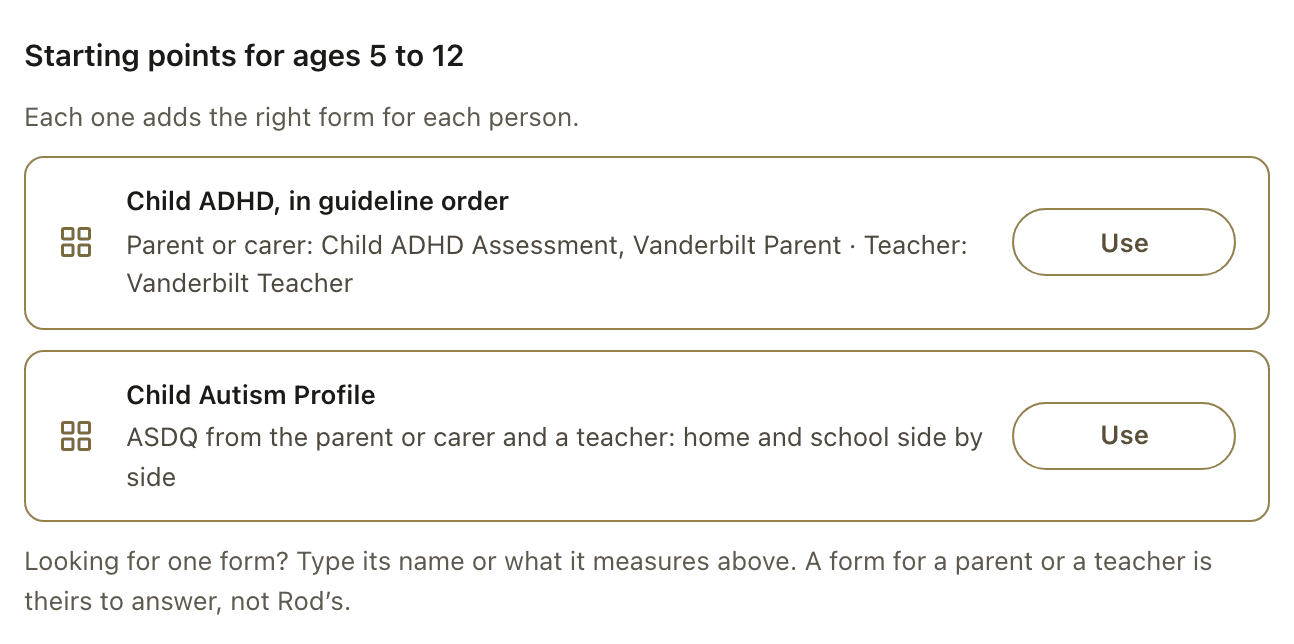
What you should seeUnder Who gets what, each person who answers has their own row: the patient, Parent or carer, Teacher, or someone who knows an adult patient well. Each form has its own link.
Step 3: Add each person's email
You
Under Who gets what, everyone who answers has a row of their own, such as Parent or carer and Teacher, each with what they get and about how long; the patient has one too when a form is theirs. Press Edit on a row to change how it reaches them. On the Parent or carer row, choose Email or I'll share the links myself. The Parent or carer email starts empty, because a patient's record may hold their own email; if the record's email is the parent's or carer's, choose Use the email on [name]'s record, which shows the address. Send stays off until the parent or carer has an email or you choose to share the links. When the send has Vanderbilt Teacher or SNAP-IV for the teacher and a form for the parent or carer, the Teacher row starts with The parent or carer passes it on: the teacher's link comes at the end of their last form and in their email. Otherwise it starts with I'll share the link myself. Its Edit offers the other choices, Email the teacher among them; with Email the teacher, leave Teacher's email, if you have it empty and the teacher's link is on the receipt for you to share.
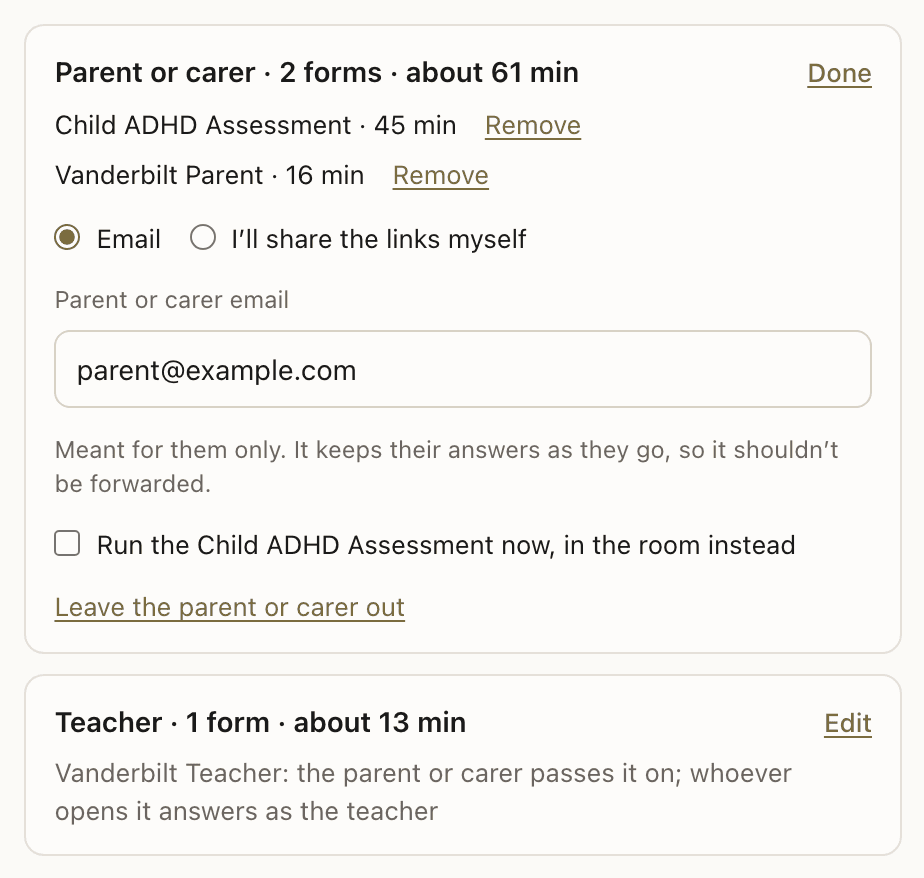
What you should seeEach person has an email, or their links are yours to share; the teacher's link can go through the parent or carer. With Email the teacher, an empty Teacher's email, if you have it puts the teacher's link on the receipt.
Step 4: Choose how each link reaches them
You
In a row's Edit, Leave the teacher out (or Leave the parent or carer out) takes that person out of this send; everything else still goes, and Add the teacher back returns them. An adult observer form has its own row, such as Someone who knows [name] well now · ASRS-O. Its Edit opens How it reaches them: Email them (they can save part-way and come back) or I'll share the link myself, and, when [name] has an email address, [name] passes it on (the patient gets a separate email with just that link, to forward). Leave ASRS-O out of this send takes that form out.
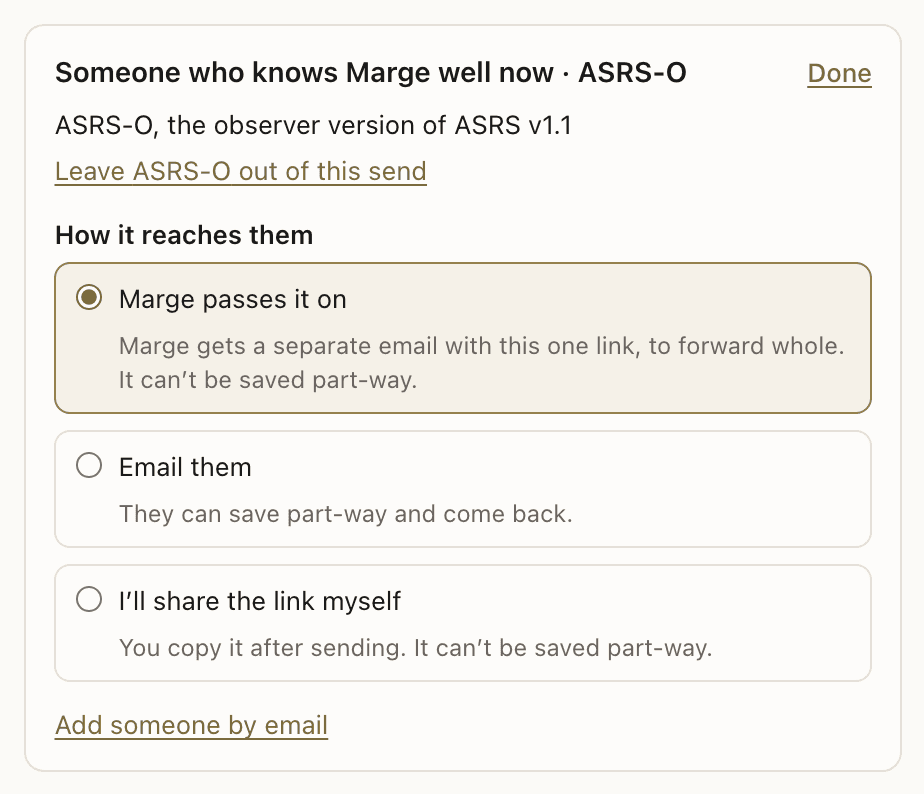
What you should seeThe receipt lists the link for each request and how it goes out.
If this looks different
If someone isn't ready yet, choose Leave the teacher out or Leave the parent or carer out in their row's Edit, or Leave ASRS-O out of this send in an adult observer's row. The rest of the send goes ahead.
Step 5: Or run the Child ADHD Assessment in the room
You
The Child ADHD Assessment (DSM-5) can be completed during the consult instead. In the Parent or carer row's Edit, tick Run the Child ADHD Assessment now, in the room instead, then go through it with the young person and a parent or carer present. Nothing is emailed for that form.
Step 6: Answers come back to the patient's record
Automatic
Each person answers on their own link, or on the link the patient passed on. Their answers are scored and filed on the patient's record, so parent, teacher and patient ratings can be read side by side. If you shared a link yourself, Copy request link on the patient's record copies it again while it is still open.
What you should seeEach person's answers appear on the patient's record.
Frequently asked questions
Do I need a separate send for the teacher?
No. Parent and teacher forms can go in the same send as the patient's own forms. Each person receives their own link.
Which forms go to a parent and which to a teacher?
Only forms written for a parent, carer or teacher ask for their email. The patient's own forms, such as ASRS, go to the patient. A parent or carer only: Child ADHD Assessment (DSM-5), Vanderbilt Parent, SDQ, AQ-Child, CAST, CDC, ChOCI-R-P, DCDQ, MFQ-Parent, PAS, PSC-17, RCADS-Parent, SCARED-Parent and SCAS-Parent. A teacher only: Vanderbilt Teacher. A parent or carer, a teacher, or both: SNAP-IV, ASDQ and ATEC. The Vanderbilt scales are validated for ages 6 to 12; for ages 13 to 17 the pathway still offers them, with a note. The Child ADHD Assessment covers ages 5 to 17.
What if I don't have the teacher's email?
When the send has Vanderbilt Teacher or SNAP-IV for the teacher and a form for the parent or carer, the Teacher row starts with The parent or carer passes it on, so the family can forward it; otherwise it starts with I'll share the link myself. Or, in its Edit, choose I'll share the link myself, or Email the teacher and leave Teacher's email, if you have it empty: the teacher's link is on the receipt, ready to pass on through the family or the school, and you can copy it again later from the patient's record.
Can someone else answer for an adult patient?
Yes. The ASRS observer report is answered by someone who knows the patient well, such as a partner, parent or friend. The WURS observer form is answered by someone who knew them as a child. Picking the patient's ASRS v1.1 or ASRS-6 adds the ASRS observer report to the same send, and the WURS-25 adds the WURS observer form. Choose Leave ASRS-O out of this send (or Leave WURS-O out of this send) in that person's row if you don't want it.
Related guides
Send an assessment to a patient
Create a patient, choose an assessment, and share the link. scored results appear on your dashboard.
Send multiple assessments in one link
Send a battery of forms. patients see a checklist and complete each one at their own pace.
Use ADHD assessment tools in practice
Activate screening, assessment, childhood history, and functional impact forms, then review scored results.
View scored results
When a patient completes an assessment, scored results with severity bands and visual charts appear on your dashboard.
Ready to try a different approach?
Calm forms for the people filling them in. Scored results and reports for you.
Full Professional access for 30 days, no card. Then a free plan with 3 forms and 10 responses.
Quiet design. Real impact.